
Overview
This page gives the short, practical model of ChokaQ before you dive into code.
You do not need to understand every internal detail before using ChokaQ. Start with the basic flow, run a sample, then use the deeper pages when a specific runtime behavior matters.
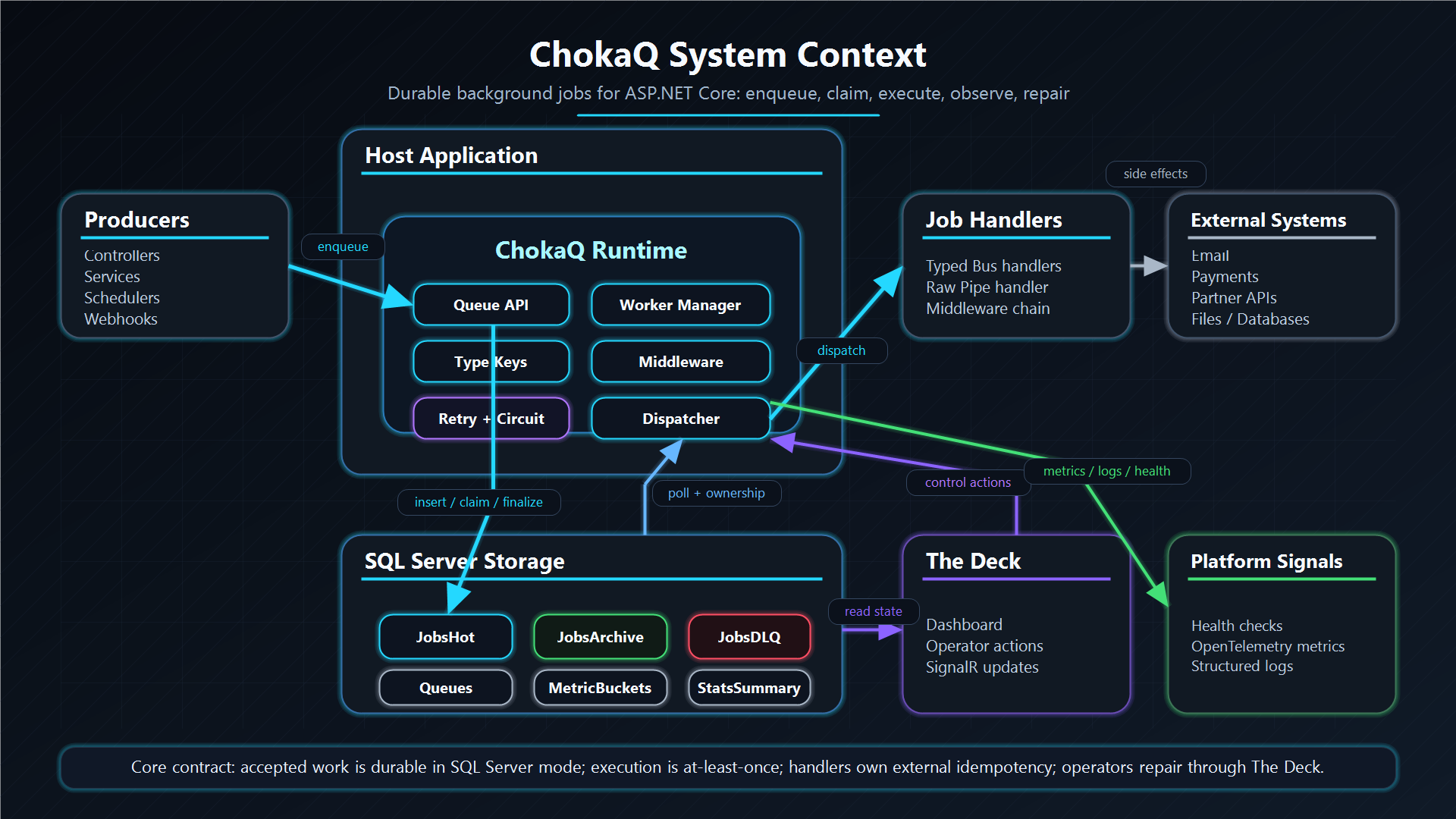
For the end-to-end embedded runtime picture, read Runtime Model first.
What Is A Background Job?
A background job is work your application accepts now but runs outside the current request.
Example:
- A user places an order.
- The API stores the order and returns quickly.
- A background job sends the receipt email.
- If email fails, the system can retry or show the failure to an operator.
This keeps checkout latency independent from the email provider and gives the system a place to retry or expose failures later.
Why Store Jobs?
If a job only lives in memory, it can disappear when the process restarts.
SQL Server mode stores accepted jobs in a database. That means:
- a restart does not erase accepted work;
- another worker can continue after a process dies;
- operators can inspect old successes and failures;
- retries and delayed jobs survive outside one process.
This is why ChokaQ's durable mode starts with SQL Server.
The Three Job Tables
ChokaQ separates job data by purpose:
| Table | What it stores | Simple meaning |
|---|---|---|
JobsHot | Pending, fetched, processing, retry, and delayed jobs. | Work that is still active. |
JobsArchive | Successful jobs. | Work that finished. |
JobsDLQ | Failed, cancelled, timed-out, or zombie jobs. | Work that needs inspection or repair. |
This separation keeps active work fast. A worker does not need to scan years of history to find the next job.
Read more in Three Pillars.
At-Least-Once Means Duplicates Are Possible
ChokaQ provides at-least-once execution.
That means it tries hard not to lose accepted work. But a handler may run more than once if a worker crashes at an unlucky time.
For safe handlers:
- sending the same email twice should be prevented by your business key;
- charging the same payment twice should be prevented by the payment provider's idempotency key;
- writing to another database should use a unique constraint or upsert;
- publishing to another system should use an outbox or dedupe key where needed.
Read Delivery Guarantees before running side-effecting jobs in production.
Workers Claim Work
Workers are the background loops that run jobs.
In SQL Server mode, workers do not just "look" at rows. They claim rows with SQL locking and ownership. This prevents two workers from intentionally processing the same job at the same time.
Read SQL Concurrency when you want to understand UPDLOCK, READPAST, ownership, and why the database is the coordination boundary.
Delayed Jobs And Retries Are Stored Schedules
A delayed job is stored now and runnable later.
ChokaQ does not need one sleeping thread per delayed job. It stores a future ScheduledAtUtc value. Workers skip the row until that time arrives.
Retries use the same idea. A failed transient job can stay in JobsHot with a future schedule instead of sleeping inside user code.
Read Delivery Guarantees for the durability contract.
The Deck Is The Operator Surface
Background systems fail when nobody is watching.
The Deck exists so operators can answer practical questions:
- Are jobs stuck?
- Which queue is lagging?
- Are workers alive?
- Which errors are repeated?
- What is in DLQ?
- Can this failed job be retried safely?
Start with Real-time SignalR, then read Operations Runbooks.
Recommended Reading Order
| Step | Page | Why |
|---|---|---|
| 1 | Getting Started | Run the system and see the basic setup. |
| 2 | Docker Compose Sample | Start SQL Server, the app, The Deck, and health checks. |
| 3 | Delivery Guarantees | Understand what ChokaQ promises and what your handlers must handle. |
| 4 | Job Contracts | Design job DTOs safely. |
| 5 | Package Topology | Understand why consumers install one package while the runtime stays modular. |
| 6 | Three Pillars | Understand Hot, Archive, and DLQ. |
| 7 | SQL Schema Atlas | Learn the database tables and indexes. |
| 8 | Transaction Integrity | Understand atomic Hot/Archive/DLQ moves and at-least-once boundaries. |
| 9 | State Machine | Follow a job from enqueue to final state. |
| 10 | Retry And DLQ | Understand retry budgets, DLQ placement, and resurrection risk. |
| 11 | Production Readiness | Check the system before production rollout. |