
Runtime Configuration
Configuration is where the host application describes operational policy.
Code tells ChokaQ what jobs exist. Configuration tells ChokaQ how the runtime should behave in this environment: how long handlers may run, how retries back off, when health becomes degraded, which SQL schema to use, and how much metric cardinality is acceptable.
ChokaQ is designed for package consumption, so production hosts should be able to keep operational policy in appsettings.json, environment variables, Key Vault-backed configuration, or any other IConfiguration provider.
The code defaults are intentionally conservative. They make a local demo work without configuration, but every important timeout and retry policy can be made explicit by the host application.
Configuration does not change ChokaQ's delivery contract. ChokaQ provides at-least-once execution; it does not provide exactly-once external side effects. Review Delivery Guarantees before tuning production queues, retries, timeouts, or shutdown behavior.
For SQL storage retry settings, see SQL Transient Retry Policy. For payload and metadata limits, see Serialization And Envelope Limits. For queue runtime controls, see Queue Controls.
How To Think About The Knobs
Most settings answer one of five questions:
| Question | Configuration area | Example |
|---|---|---|
| How long may user code run? | Execution | DefaultTimeout |
| What happens after transient failure? | Retry | BaseDelay, MaxAttempts, JitterMaxDelay |
| How do workers recover abandoned work? | Recovery | FetchedJobTimeout, ProcessingZombieTimeout |
| When should monitoring complain? | Health | QueueLagUnhealthyThreshold |
| How does SQL storage behave? | SqlServer | SchemaName, CommandTimeoutSeconds, CleanupBatchSize |
Start with defaults for a local demo. For a real service, make the important values explicit and commit them with the host application configuration.
Recommended Program.cs
var builder = WebApplication.CreateBuilder(args);

builder.Services.AddChokaQ(
    builder.Configuration.GetSection("ChokaQ"),
    options =>
    {
        // Profiles and middleware are compile-time registrations.
        // Runtime policy comes from appsettings unless code intentionally overrides it here.
        options.AddProfile<MailingProfile>();
        options.AddMiddleware<CorrelationMiddleware>();
    });

builder.Services.UseSqlServer(
    builder.Configuration.GetSection("ChokaQ:SqlServer"));

builder.Services.AddHealthChecks()
    .AddChokaQSqlServerHealthChecks(builder.Configuration.GetSection("ChokaQ:Health"));
Binding order is:
- ChokaQ code defaults.
IConfigurationvalues.- Optional code callback overrides.
- Per-queue runtime overrides where supported.
This order lets platform teams keep environment policy in configuration while application code still owns type-safe registrations such as profiles, handlers, and middleware.
appsettings.json
{
  "ChokaQ": {
    "Execution": {
      "DefaultTimeout": "00:15:00",
      "HeartbeatIntervalMin": "00:00:08",
      "HeartbeatIntervalMax": "00:00:12",
      "HeartbeatFailureThreshold": 10,
      "CancelOnHeartbeatFailure": false,
      "PendingCancellationRetention": "00:00:30"
    },
    "Retry": {
      "MaxAttempts": 3,
      "BaseDelay": "00:00:03",
      "MaxDelay": "01:00:00",
      "BackoffMultiplier": 2.0,
      "JitterMaxDelay": "00:00:01",
      "CircuitBreakerDelay": "00:00:05",
      "MaxJobAge": "1.00:00:00"
    },
    "Recovery": {
      "FetchedJobTimeout": "00:10:00",
      "ProcessingZombieTimeout": "00:10:00",
      "ScanInterval": "00:01:00"
    },
    "Worker": {
      "PausedQueuePollingDelay": "00:00:01",
      "ShutdownGracePeriod": "00:00:30"
    },
    "InMemory": {
      "MaxCapacity": 100000
    },
    "Health": {
      "WorkerHeartbeatTimeout": "00:00:30",
      "QueueLagDegradedThreshold": "00:00:05",
      "QueueLagUnhealthyThreshold": "00:00:10"
    },
    "Metrics": {
      "MaxQueueTagValues": 100,
      "MaxJobTypeTagValues": 500,
      "MaxErrorTagValues": 100,
      "MaxFailureReasonTagValues": 50,
      "MaxTagValueLength": 128,
      "UnknownTagValue": "unknown",
      "OverflowTagValue": "other"
    },
    "Serialization": {
      "MaxPayloadBytes": 1000000
    },
    "Idempotency": {
      "InProgressTtl": "00:30:00",
      "DefaultResultTtl": null,
      "MinResultTtl": null,
      "MaxResultTtl": null
    },
    "TypeResolution": {
      "RequireRegisteredJobTypes": true
    },
    "Queues": {
      "reports": {
        "ExecutionTimeout": "01:00:00"
      }
    },
    "SqlServer": {
      "ConnectionString": "Server=localhost;Database=ChokaQ;Trusted_Connection=True;TrustServerCertificate=True;",
      "SchemaName": "chokaq",
      "AutoCreateSqlTable": false,
      "PollingInterval": "00:00:01",
      "NoQueuesSleepInterval": "00:00:05",
      "CommandTimeoutSeconds": 30,
      "CleanupBatchSize": 1000,
      "WorkerShutdownGracePeriod": "00:00:30",
      "PrefetchedJobReleaseTimeout": "00:00:05",
      "MaxTransientRetries": 3,
      "TransientRetryBaseDelayMs": 200
    }
  }
}
Execution
Execution.DefaultTimeout is the hard wall-clock limit for a job handler. If user code does not finish before the timeout, ChokaQ cancels the handler token and moves the job through the timeout path.
Why this exists: a stuck handler can hold a worker lease forever. That hides queue saturation, prevents other jobs from running, and forces operators to fix the system by hand. A background processor should have an explicit execution boundary.
Timeout is not the same operational intent as admin cancellation. Timeout means the execution boundary was exceeded. Admin cancellation means an operator or API asked ChokaQ to stop or remove work. Treat those outcomes separately in runbooks, dashboards, and application logic.
Queues:{queueName}:ExecutionTimeout overrides the global timeout for one queue. Use it for real workload differences. For example, a reports queue might need one hour, while the default queue should still fail fast after fifteen minutes.
Execution.HeartbeatFailureThreshold controls when repeated heartbeat write failures become a degraded execution signal. The default is 10 consecutive failures. ChokaQ records chokaq.jobs.heartbeat_failures and logs degraded heartbeat state; it does not cancel user code by default because heartbeat failure often points to SQL/network pressure rather than a bad handler.
Set Execution.CancelOnHeartbeatFailure to true only when your deployment prefers fail-fast cancellation over letting zombie recovery make the final abandoned-job decision.
Execution.PendingCancellationRetention closes the small race where an admin cancellation reaches the processor just before an execution token is registered. Expired pending cancels are ignored so a later resurrection with the same job ID does not inherit stale cancellation.
Retry
Retry.MaxAttempts is the maximum total number of executions, including the first try. The old MaxRetries property still exists for compatibility, but new configuration should use Retry.MaxAttempts.
Retry.BaseDelay, Retry.BackoffMultiplier, and Retry.MaxDelay define exponential backoff. With the defaults, retry delays start at three seconds, double after each failed attempt, and never exceed one hour.
Retry.JitterMaxDelay adds randomness to retry scheduling. Jitter prevents thousands of jobs from retrying at the same millisecond after a downstream outage. The jitter is clipped by Retry.MaxDelay, so the max delay remains a true operational cap.
Retry.CircuitBreakerDelay is used when the circuit breaker blocks a job type. The job is rescheduled instead of executed immediately, which reduces pressure on a dependency that is already unhealthy.
Retry.MaxJobAge is the wall-clock lifetime budget for retrying a job. The default is one day. If the next retry would be scheduled after CreatedAtUtc + MaxJobAge, ChokaQ moves the job to DLQ with FailureReason.RetryLifetimeExpired instead of keeping old work alive forever. Set it to null only when the application owns another lifetime boundary.
Recovery
Recovery.FetchedJobTimeout applies to jobs claimed by a worker but not yet executing user code. Recovering these jobs is safe because no handler side effects have happened.
Recovery.ProcessingZombieTimeout applies to jobs that started user code but stopped sending heartbeats. These jobs are moved to DLQ as zombies because they may have already produced side effects and should be inspected.
Recovery.ScanInterval controls how often ZombieRescueService searches for abandoned and zombie jobs. Shorter intervals reduce time-to-recovery. Longer intervals reduce database load.
In-Memory
InMemory.MaxCapacity is the soft cap for jobs retained by the in-process Three Pillars store. The default is 100000. When the cap is reached, ChokaQ evicts old Archive rows first and old DLQ rows second. Hot rows are preserved because they represent accepted work that the in-memory worker still needs to process.
Why this exists: in-memory mode is useful for demos, tests, local development, and volatile streams, but process memory is not an infinite queue. The cap keeps historical rows from growing without bound while making the tradeoff explicit: SQL Server mode is the production choice when backlog durability and restart survival matter.
The in-memory worker is channel-driven. The bounded Channel<IChokaQJob> is the volatile execution notification source, while the in-process Hot row is a control/audit row that lets the worker reject stale channel items. The worker executes only when the Hot row is still Pending and the persisted type key and payload match the channel item. Orphaned Hot rows can remain after a process crash between enqueue/resurrection and channel drain; they are not recovered across process restart. Use SQL Server mode for durable backlog and restart-safe admin restart.
Worker.ShutdownGracePeriod bounds how long in-memory worker shutdown waits for worker loops to observe cancellation.
For the full policy, see Backpressure Policy.
SQL Server
SqlServer.PollingInterval controls how often the SQL worker polls when active queues exist but no jobs are currently available.
SqlServer.NoQueuesSleepInterval controls the sleep duration when every queue is paused or inactive.
SqlServer.CommandTimeoutSeconds is the maximum time for each SQL command ChokaQ issues. It applies to worker fetches, state transitions, dashboard reads, recovery scans, and admin commands. It does not control user handler execution; that is Execution.DefaultTimeout.
SqlServer.CleanupBatchSize is the maximum number of Archive or DLQ rows ChokaQ deletes in one cleanup transaction. The default is 1000. Lower it when SQL Server is shared with latency-sensitive workloads or transaction-log pressure matters more than cleanup speed. Raise it when retention cleanup must catch up quickly and the database has enough log and IO headroom.
Why this exists: retention cleanup is operational maintenance, not user work. A single huge DELETE can hold locks, grow the transaction log, and make workers or dashboard queries wait. Batching cleanup gives administrators a simple pressure valve while keeping purge APIs easy to use.
SqlServer.MaxTransientRetries and SqlServer.TransientRetryBaseDelayMs configure retries around transient SQL failures such as deadlocks or short network blips. These retries protect storage operations, not user job handlers.
SqlServer.WorkerShutdownGracePeriod bounds how long the SQL worker waits for active processing tasks during shutdown. A handler that ignores cancellation can outlive this budget; if the host then kills the process, the Processing row is handled later by zombie recovery.
SqlServer.PrefetchedJobReleaseTimeout bounds the cleanup call used to release prefetched but unstarted Fetched jobs back to Pending during pause or shutdown.
When AutoCreateSqlTable is enabled, ChokaQ also creates [schema].[SchemaMigrations]. This table records the applied ChokaQ SQL schema version. Version 1 represents the initial Three Pillars schema, version 2 records hot-path index hardening, and version 3 adds rolling MetricBuckets for materialized throughput and failure-rate windows. Future SQL migrations should append one row after they successfully apply, which gives operators a database-side audit trail during upgrades.
Metrics
ChokaQ emits OpenTelemetry instruments through System.Diagnostics.Metrics using the meter name ChokaQ. The library does not install exporters; the host application decides whether those metrics go to Prometheus, OTLP, Application Insights, or another backend.
| Instrument | Type | Unit | Tags | Meaning |
|---|---|---|---|---|
chokaq.jobs.enqueued | Counter | none | queue, type | Jobs accepted by storage. |
chokaq.jobs.completed | Counter | none | queue, type | Jobs archived as successful. |
chokaq.jobs.failed | Counter | none | queue, type, error | Handler executions that threw. |
chokaq.jobs.processing_duration | Histogram | ms | queue, type | Wall-clock handler duration. |
chokaq.jobs.queue_lag | Histogram | ms | queue, type | Time a job waited before execution. |
chokaq.jobs.dlq | Counter | none | queue, type, reason | Jobs moved to DLQ. |
chokaq.jobs.retried | Counter | none | queue, type, attempt | Jobs scheduled for another attempt. |
chokaq.workers.active | UpDownCounter | none | queue | Active worker delta by queue. |
chokaq.jobs.heartbeat_failures | Counter | none | queue, type | Failed per-job heartbeat writes. |
chokaq.jobs.state_transition_conflicts | Counter | none | queue, type, transition | Worker-owned state transitions that affected no rows. |
chokaq.idempotency.claims | Counter | none | outcome | Idempotency claim-store outcomes such as claimed, duplicate, released, or completion conflict. |
chokaq.circuits.events | Counter | none | type, state, event | Circuit breaker open, close, reject, half-open probe, release, and timeout events. |
Metrics.MaxQueueTagValues, Metrics.MaxJobTypeTagValues, Metrics.MaxErrorTagValues, and Metrics.MaxFailureReasonTagValues cap the number of distinct tag values one process emits for each tag family. Once a budget is exhausted, new values are reported as Metrics.OverflowTagValue instead of creating new time series.
Metrics.UnknownTagValue replaces blank tag values. Metrics.MaxTagValueLength trims long values before cardinality tracking. The defaults preserve useful operator dimensions while preventing accidental unbounded cardinality.
Why this exists: labels are the dangerous part of metrics. A stable counter name is cheap; a tag that contains tenant IDs, generated queue names, exception messages, or user data can create thousands of time series and make the monitoring backend slow or expensive. ChokaQ keeps high-value dimensions but puts a hard ceiling on the damage one process can cause.
Operational runbooks:
Serialization
Serialization.MaxPayloadBytes is the maximum UTF-8 byte size for a serialized job payload accepted by enqueue. Oversized payloads fail before storage mutation, so producers see a clear boundary violation instead of a provider-specific SQL or memory failure.
The default Bus-mode serializer uses shared System.Text.Json options through ChokaQ's serializer contract. Its default casing matches ordinary System.Text.Json serialization rather than ASP.NET Core Web defaults, so existing PascalCase payloads remain compatible. Hosts that need different JSON behavior can replace IChokaQJobSerializer in DI before ChokaQ creates jobs, but changing serializer behavior affects old rows already stored in SQL, Archive, or DLQ.
Treat persisted payloads as message contracts. Additive DTO changes are usually safer than renames or removals; breaking schema changes should use a new profile type key such as email.send.v2.
Idempotency
Idempotency.InProgressTtl controls how long the optional idempotency middleware keeps an active execution claim before another worker may claim the same idempotency key. Set it longer than the normal execution time for the protected operation.
Idempotency.DefaultResultTtl is used when an IIdempotentJob returns null from ResultTtl. MinResultTtl and MaxResultTtl can enforce business retention bounds so one job cannot accidentally keep completion markers for too little or too much time.
The built-in in-memory idempotency store is claim-based: the first execution writes an InProgress claim, concurrent duplicates see AlreadyInProgress and skip handler execution, and successful completion writes a completion marker. Handler failure releases the claim so a later retry can execute. Expired in-memory claim and completion entries are removed opportunistically in bounded cleanup passes as the store is used, but this store is still process-local development infrastructure, not durable production state.
For production multi-instance deployments, use a shared store. A Redis strategy should use atomic SET ... NX ... EX or Lua scripts for begin/complete/release state transitions. A SQL strategy should use a unique key plus atomic insert/update transactions. Stores that only implement the older IIdempotencyStore interface are adapted for source compatibility, but they do not provide the same atomic in-progress claim semantics.
Type Resolution
TypeResolution.RequireRegisteredJobTypes controls whether Bus-mode enqueue and dispatch require every job DTO to be registered through a ChokaQJobProfile.
Set it to true for production. Registered profile keys, such as email.send.v1, are stable persisted message-contract names and survive CLR renames or namespace refactors.
When it is false, unregistered Bus jobs can use an assembly-qualified CLR fallback identity for compatibility. ChokaQ does not persist or resolve unregistered jobs by CLR short name, because two different namespaces can contain classes with the same short name. When it is true, persisted assembly-qualified fallback identities are rejected at dispatch too; register the type key or migrate the old row.
Structured Log Events
ChokaQ emits lifecycle logs with stable EventId values. The message template is for humans; the event ID is for machines. Use EventId.Id or EventId.Name in SIEM queries, alert rules, and runbooks instead of searching for fragile text snippets.
| Range | Area | Examples |
|---|---|---|
1000-1099 | Worker service and loop lifecycle. | WorkerStarted, WorkerStopped, WorkerLoopCrashed |
2000-2099 | Individual job execution lifecycle. | JobSucceededArchived, JobTimedOutOrCancelled |
2100-2199 | Persisted state transitions and UI notification plumbing. | StateTransitionNotApplied, NotificationFailed |
3000-3099 | Enqueue producer boundary. | EnqueueDuplicateSkipped, EnqueueNotificationFailed |
4000-4099 | Recovery and zombie rescue. | AbandonedJobsRecovered, ZombieJobsArchived |
5000-5099 | SQL provisioning and storage boundary. | SqlInitializationStarted, SqlInitializationFailed |
6000-6099 | Operator/admin command boundary. | AdminCommandRejected, AdminCommandCompleted |
Why this exists: background processors fail across multiple layers. A job can be rejected by a circuit breaker, lose worker ownership, retry, move to DLQ, or be changed by an operator. Stable event IDs let an on-call engineer reconstruct that path even when log wording changes in a future release.
Health Checks
ChokaQ integrates with the standard ASP.NET Core health-check pipeline. This is the right boundary for host applications and future package consumers: the host decides the route, authentication, Kubernetes probes, and monitoring integration, while ChokaQ contributes domain-specific checks.
For SQL Server mode:
builder.Services.AddHealthChecks()
    .AddChokaQSqlServerHealthChecks(builder.Configuration.GetSection("ChokaQ:Health"));

app.MapHealthChecks("/health");
For in-memory or pipe-only mode:
builder.Services.AddHealthChecks()
    .AddChokaQHealthChecks(builder.Configuration.GetSection("ChokaQ:Health"));

app.MapHealthChecks("/health");
Registered check names:
| Check | Meaning |
|---|---|
chokaq_sql | SQL Server is reachable and the ChokaQ schema contains the required runtime tables. |
chokaq_worker | The hosted worker is running, has capacity, and has produced a recent process-local heartbeat. |
chokaq_queue_saturation | The worst pending queue lag is inside the configured operational thresholds. |
Health.WorkerHeartbeatTimeout is the maximum age of the worker's process-local heartbeat. This is not the same as per-job heartbeat storage: per-job heartbeats tell zombie recovery whether a specific job is still alive; the worker heartbeat tells operators whether the hosted worker loop itself is alive.
Health.QueueLagDegradedThreshold and Health.QueueLagUnhealthyThreshold map queue saturation into readiness status. The defaults match The Deck's dashboard colors: under five seconds is healthy, five to ten seconds is degraded, and above ten seconds is unhealthy.
Why this exists: queue depth alone is often misleading. A queue with 10,000 fast jobs might be fine, while a queue with 20 old jobs might mean the worker is stuck. Lag measures how long real work has waited, so it is a better operator signal for saturation.
Validation
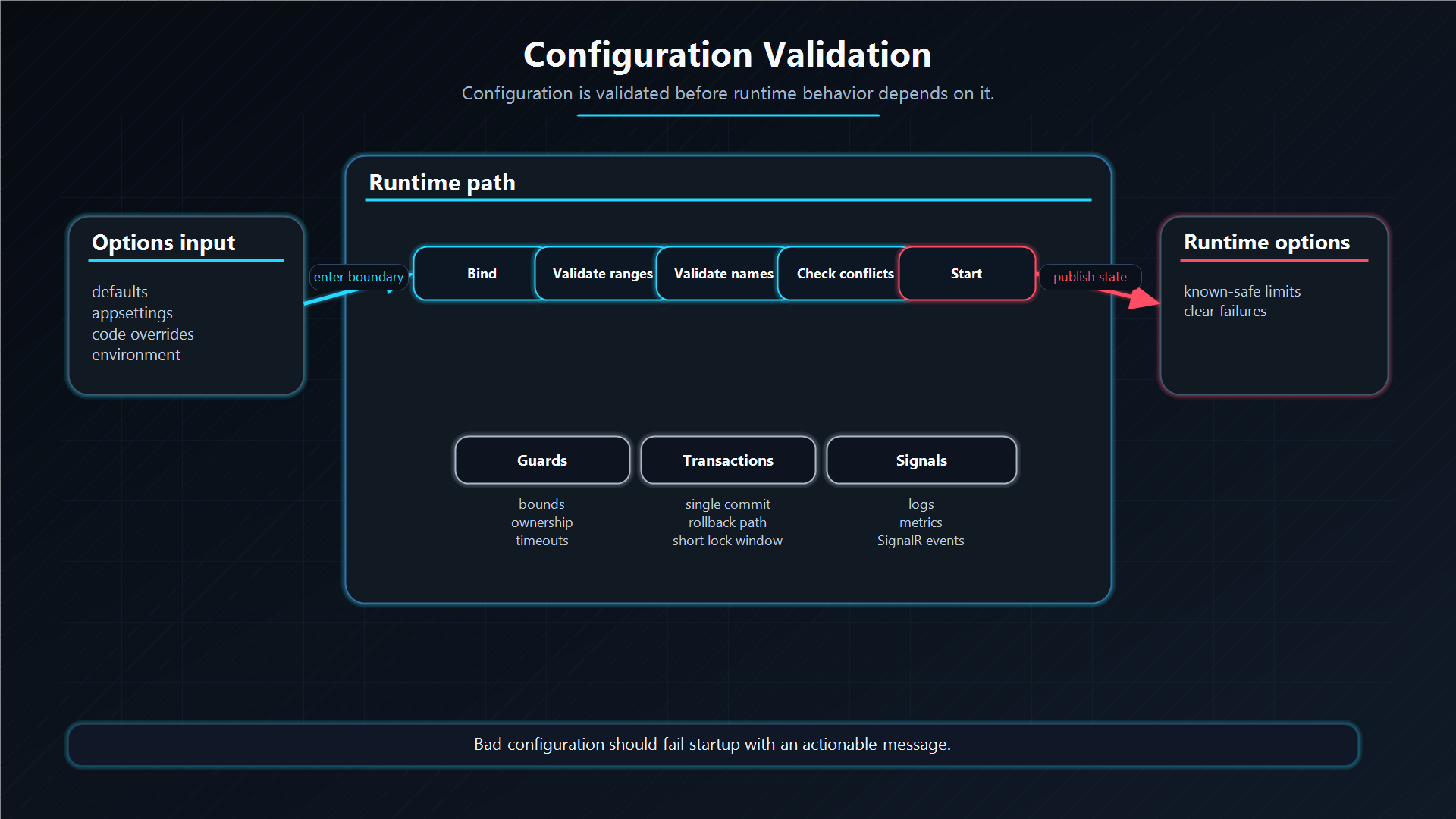
ChokaQ validates configuration during service registration. Invalid values fail application startup before workers can claim real jobs.
Examples of rejected values:
- zero or negative execution timeout.
- zero retry attempts.
- retry max delay smaller than retry base delay.
- heartbeat max interval smaller than heartbeat min interval.
- zero in-memory capacity.
- empty SQL connection string.
- zero SQL polling interval.
- zero SQL command timeout.
- zero SQL cleanup batch size.
- zero or negative worker heartbeat timeout.
- queue lag unhealthy threshold smaller than the degraded threshold.
- zero metric tag cardinality budget.
- blank metric unknown or overflow tag value.
Fail-fast validation is deliberate. A queue processor should not discover invalid operational policy after it has already accepted production work.
Architecture Decision
Why this pattern?
Runtime configuration controls durability, retry, recovery, health, metrics, and security posture. Failing fast at startup is safer than letting a worker run with invalid operational policy.
Trade-offs
Strict validation can reject a host that might otherwise start. For queue infrastructure, bad config should be visible before jobs are claimed.
Alternatives considered
| Alternative | Benefit | Cost |
|---|---|---|
| Silent defaults | Easy startup. | Hidden production mistakes. |
| Warn only | Flexible. | Workers may run with unsafe policy. |
| Validate at first use | Lazy. | Failures happen after jobs are accepted. |
Additional Questions
Why validate config at startup?
Because retry, storage, and dashboard policy must be correct before workers claim production work.
Which config is most dangerous?
Connection string, timeout, retry, heartbeat/zombie recovery, and dashboard authorization settings.
Why separate code registration from appsettings policy?
Code owns compile-time contracts; configuration owns environment-specific runtime behavior.