
Runtime Model
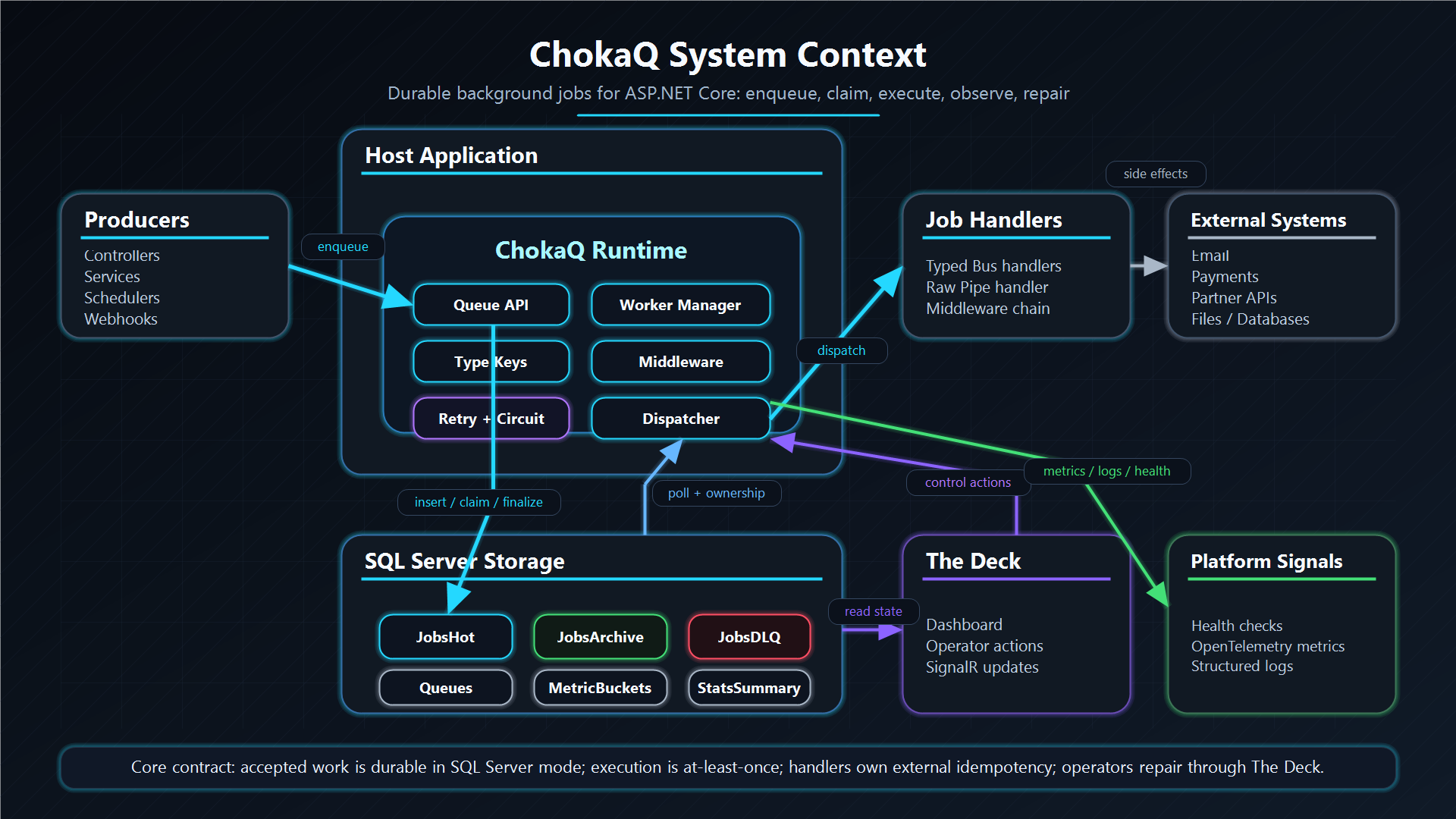
This page is the shortest mental model for ChokaQ. Read it before the deep dives.
ChokaQ is not a separate queue server that calls your application back over the network. It is a .NET package that runs inside your application process. Your application enqueues jobs, ChokaQ stores them in SQL Server, and ChokaQ's hosted worker later calls your registered handlers through dependency injection.
The Shape
Your application process
├─ API, UI, controllers, services
├─ IChokaQQueue.EnqueueAsync(...)
├─ ChokaQ hosted worker
├─ Your job handlers
└─ The Deck dashboard

SQL Server
├─ JobsHot
├─ JobsArchive
├─ JobsDLQ
├─ Queues
└─ MetricBuckets
The application owns business code. ChokaQ owns delivery, storage transitions, retry policy, heartbeat, DLQ, metrics, and operator visibility.
End-To-End Flow
- Application code creates a job DTO.
- Application code calls
IChokaQQueue.EnqueueAsync(...). - ChokaQ resolves the job's type key from
ChokaQJobProfile. - ChokaQ serializes the job payload.
- ChokaQ inserts a
Pendingrow intoJobsHot. - A ChokaQ worker polls SQL Server and claims eligible rows.
- The worker moves the row to
Fetchedand places it in a bounded local buffer. - A processor takes the row, validates ownership, and moves it to
Processing. - ChokaQ deserializes the payload and resolves your handler from DI.
- ChokaQ calls your handler.
- On success, the job moves to
JobsArchive. - On retryable failure, the job is rescheduled in
JobsHot. - On terminal failure, cancellation, or zombie detection, the job moves to
JobsDLQ. - The Deck, health checks, metrics, and logs expose the result.
Example Workload
Imagine one application needs to:
- send 1,000 emails;
- send 50,000 messages;
- create 300 heavy Excel reports that each take about five minutes.
The application does not pass a method pointer to ChokaQ. It stores durable job messages:
await queue.EnqueueAsync(new SendEmailJob(customerId, templateId));
await queue.EnqueueAsync(new SendMessageJob(channelId, body));
await queue.EnqueueAsync(new CreateExcelReportJob(reportId, fromUtc, toUtc));
Each message has a registered handler:
CreateJob<SendEmailJob, SendEmailHandler>("email.send.v1");
CreateJob<SendMessageJob, SendMessageHandler>("message.send.v1");
CreateJob<CreateExcelReportJob, CreateExcelReportHandler>("report.excel.create.v1");
ChokaQ does not know how to send email or build Excel files. Your handlers know that. ChokaQ knows how to store the work, claim it once, call the right handler, retry safely, isolate queues, and preserve failures for inspection.
Queue Isolation
Different workloads should usually use different queues:
emails      -> fast, external provider limited
messages    -> high volume, throughput sensitive
reports     -> slow, CPU/IO heavy
Queue-level controls prevent slow work from consuming every execution slot:
{
  "ChokaQ": {
    "Queues": {
      "emails": { "MaxWorkers": 20 },
      "messages": { "MaxWorkers": 50 },
      "reports": {
        "MaxWorkers": 3,
        "ZombieTimeoutSeconds": 2400
      }
    }
  }
}
With this shape, 300 five-minute report jobs remain durable backlog in SQL. They do not fill process memory, and they do not have to block email or message work.
Multiple Application Instances
If you run three instances of the same application, all three can run ChokaQ workers against the same SQL Server database:
App instance A ┐
App instance B ├─ SQL Server
App instance C ┘
Workers coordinate through SQL row locks and ownership predicates. One job is claimed by one worker. Horizontal scaling increases processing capacity until SQL Server or a downstream dependency becomes the bottleneck.
What Happens On Failure
ChokaQ is an at-least-once execution engine. That means a handler can run more than once after crashes or recovery. Your handlers must be idempotent when they produce external side effects.
Common outcomes:
| Situation | ChokaQ behavior |
|---|---|
| Handler succeeds | Move from JobsHot to JobsArchive. |
| Transient dependency failure | Reschedule in JobsHot with retry delay and jitter. |
| Fatal payload or code error | Move to JobsDLQ with failure details. |
| Worker crashes before user code starts | Return stale Fetched work to Pending. |
| Worker crashes during handler execution | Heartbeat expires; move job to DLQ as Zombie. |
| Operator fixes a DLQ payload | Resurrect row back to JobsHot for normal execution. |
Where To Go Next
| If you want to understand | Read |
|---|---|
| How to register jobs and handlers | Getting Started |
| What a job contract should look like | Job Contracts |
| The full state machine | State Machine |
| How SQL workers claim rows safely | SQL Concurrency |
| How handlers are invoked | Expression Trees |
| How failures are retried or sent to DLQ | Retry And DLQ |
| How to operate the system | Operations Runbooks |