
Edit + Resurrect (DLQ Management)
The Problem: Dead Jobs With Fixable Errors
A job fails because of a malformed JSON payload:
{
  "to": "user@example.com",
  "subject": "Welcome!"
  "body": "Hello, World!"     // ← Missing comma after "subject"
}
Without an operator workflow, teams often fall back to manual recovery:
- fix code or data, then manually enqueue replacement work;
- write an ad hoc SQL script to update a failed row;
- leave the failed work unresolved until a support process handles it.
Those paths can be valid in emergencies, but they are hard to audit and easy to apply inconsistently.
ChokaQ's Solution: Edit + Resurrect
The Deck provides in-browser editing of DLQ job data and one-click resurrection.
The Workflow
1. Job fails → lands in DLQ with FailureReason + ErrorDetails
2. Admin opens The Deck → navigates to DLQ panel
3. Clicks on the failed job → Inspector opens
4. Sees the full exception stack trace
5. Edits the JSON payload directly in the browser
6. Clicks "Resurrect" → job moves back to JobsHot with fixed payload
7. Job processes successfully on the next fetch cycle
DLQ Inspector
The Inspector panel shows complete job details:
| Field | Example |
|---|---|
| Job ID | 01JARX7K8F... |
| Type | email_v1 |
| Queue | notifications |
| Failure Reason | MaxRetriesExceeded |
| Attempts | 3 |
| Failed At | 2026-04-30 14:32:07 UTC |
| Worker ID | worker-prod-01 |
| Error Details | Full exception with stack trace |
| Payload | Editable JSON |
| Tags | Editable metadata |
Editing Dead Jobs
Two levels of editing:
1. Edit in DLQ (without resurrecting)
Fix data for later analysis or batch resurrection:
await _storage.UpdateDLQJobDataAsync(
    jobId: "job-123",
    updates: new JobDataUpdateDto
    {
        Payload = fixedJson,
        Tags = "reviewed,fixed-payload"
    },
    modifiedBy: "admin@company.com"
);
The job stays in DLQ but with corrected data.
2. Edit + Resurrect (fix and retry)
Fix the payload AND move back to Hot table in one operation:
await _storage.ResurrectAsync(
    jobId: "job-123",
    updates: new JobDataUpdateDto
    {
        Payload = fixedJson,          // Fixed JSON
        Tags = "resurrected,manual",  // Audit trail
        Priority = 30                 // Boost priority
    },
    resurrectedBy: "admin@company.com"
);
What Happens During Resurrection
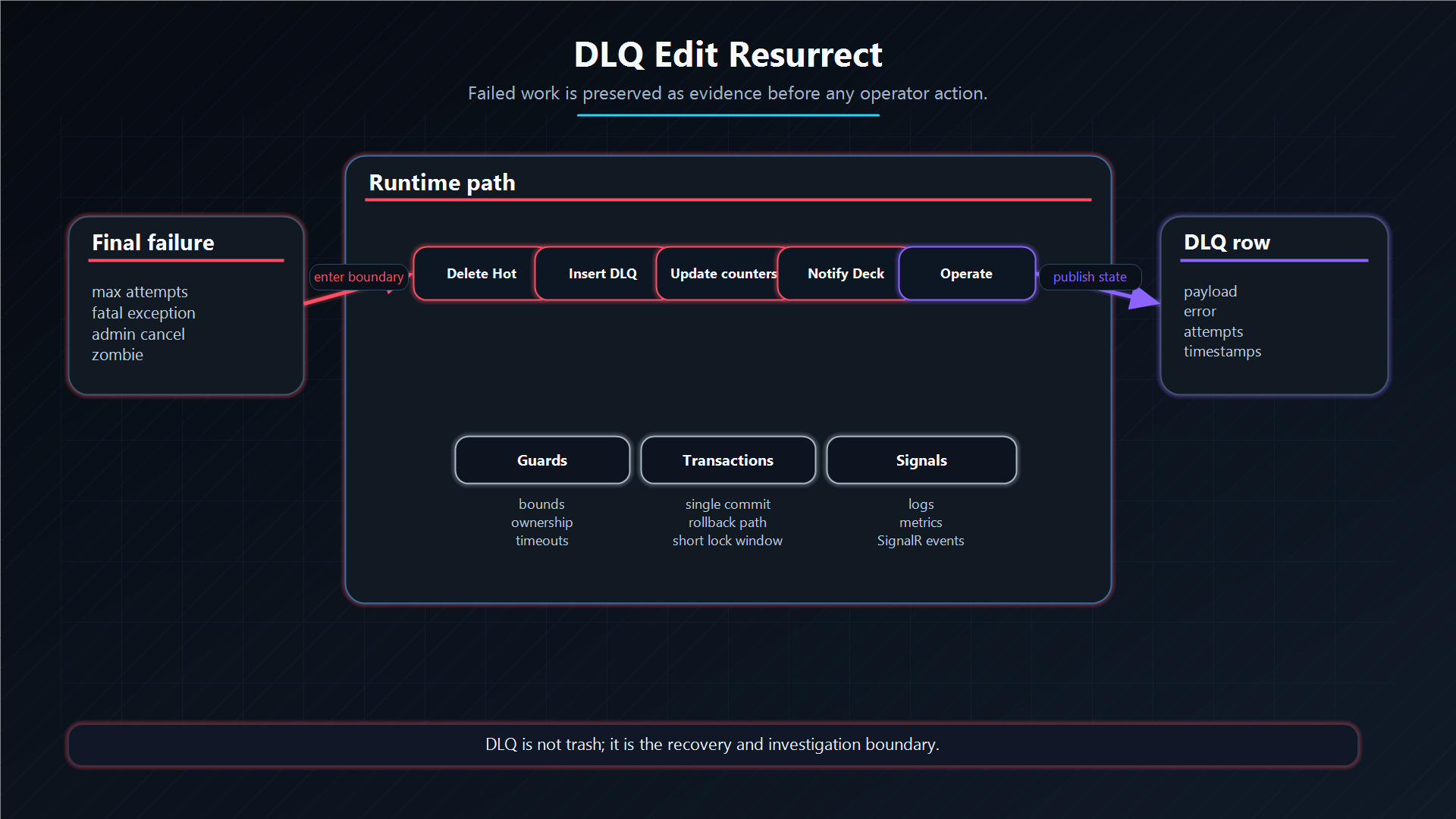
The SQL atomically:
- Deletes the job from
JobsDLQ - Inserts into
JobsHotwith:Status = 0 (Pending)— back in queueAttemptCount = 0— fresh start- Updated Payload/Tags/Priority (if provided)
LastModifiedBy = "admin@company.com"— audit trail
- Decrements
StatsSummary.FailedTotal— stats stay accurate
DELETE FROM [chokaq].[JobsDLQ]
OUTPUT
    DELETED.[Id], DELETED.[Queue], DELETED.[Type],
    CASE WHEN @NewPayload IS NOT NULL
         THEN @NewPayload ELSE DELETED.[Payload] END,
    CASE WHEN @NewTags IS NOT NULL
         THEN @NewTags ELSE DELETED.[Tags] END,
    NULL,                              -- IdempotencyKey cleared
    ISNULL(@NewPriority, 10),          -- New or default priority
    0,                                 -- Status = Pending
    0,                                 -- AttemptCount = 0 (fresh)
    NULL, NULL,                        -- WorkerId, HeartbeatUtc
    NULL, DELETED.[CreatedAtUtc], NULL,
    SYSUTCDATETIME(),
    DELETED.[CreatedBy], @ResurrectedBy
INTO [chokaq].[JobsHot](...)
WHERE [Id] = @JobId;
Bulk Operations
Bulk Resurrect
Resurrect multiple jobs at once (e.g., "retry all zombies from yesterday"):
var zombieIds = dlqJobs
    .Where(j => j.FailureReason == FailureReason.Zombie)
    .Select(j => j.Id)
    .ToArray();

int resurrected = await _storage.ResurrectBatchAsync(
    jobIds: zombieIds,
    resurrectedBy: "admin@company.com"
);
// Processed in batches of 1000 for transaction safety
Bulk Cancel
Cancel pending jobs that are no longer needed:
int cancelled = await _storage.ArchiveCancelledBatchAsync(
    jobIds: selectedIds,
    cancelledBy: "admin@company.com"
);
Purge
Permanently delete jobs from DLQ (irreversible):
await _storage.PurgeDLQAsync(jobIds);Or purge old archive entries:
int deleted = await _storage.PurgeArchiveAsync(
    olderThan: DateTime.UtcNow.AddDays(-90)
);
SQL Server cleanup deletes rows in bounded transactions controlled by SqlServer.CleanupBatchSize (default: 1000). Operators still call one purge method, but storage repeats short database commits underneath so retention work does not monopolize locks or transaction log space.
Safety Gates
Hot-Edit Safety
Editing active jobs in the Hot table is restricted:
// UpdateJobDataAsync — only works for Pending jobs
public async ValueTask<bool> UpdateJobDataAsync(
    string jobId, JobDataUpdateDto updates, ...)
{
    // WHERE Status = 0 — Safety gate!
    // Cannot edit Fetched or Processing jobs
}
If the job is already being processed (Status = 1 or 2), the edit returns false. This prevents corrupting in-flight work.
DLQ Edit Safety
DLQ edits have no status restriction — the job is already dead. But all edits are audited via LastModifiedBy.
💡 Design Decision
When a job is resurrected, its AttemptCount is reset to 0 because the root cause was likely fixed (payload corrected, external service restored). This gives the job a full set of fresh retry attempts. If the fix didn't work, the Smart Worker will classify the error and route it back to DLQ.
Common Use Cases
| Scenario | Action |
|---|---|
| Malformed JSON payload | Edit payload in DLQ → Resurrect |
| External API was down | Wait for recovery → Bulk resurrect all MaxRetriesExceeded |
| Code bug fixed and deployed | Bulk resurrect all Fatal jobs of that type |
| Zombie from server restart | Resurrect if idempotent, Purge if not |
| Cancelled by mistake | Resurrect with original data |
| Old archive cleanup | PurgeArchiveAsync(olderThan: 90 days) |
Architecture Decision
Edit and resurrect exists because production failures are not always fixed by restarting workers. Sometimes the handler is correct and the payload is wrong; sometimes a dependency outage is over and dead work needs a controlled second chance. Making operators write ad hoc SQL for that workflow is both risky and hard to audit.
ChokaQ therefore makes resurrection a first-class storage operation. It moves a DLQ row back into Hot under one database operation, resets retry state, records who made the change, and lets the normal worker path process the job again. This keeps recovery inside the same lifecycle model instead of creating a parallel manual re-enqueue path.
The trade-off is power. Editing payloads is a dangerous capability and should be protected by authorization, audit logging, and operational discipline. The Deck should make the workflow easy, but not casual.
Additional Questions
Why reset AttemptCount during resurrection?
Resurrection implies an operator changed the conditions: payload fixed, code deployed, or dependency recovered. A fresh retry budget lets the normal policy evaluate the repaired job.
Why not update the DLQ row in place and process it from DLQ?
Because DLQ is a terminal inspection table. Moving the row back to Hot restores the standard execution path: fetch, processing, heartbeat, retry, archive, and metrics.
What prevents unsafe editing of in-flight jobs?
Hot edits are limited to Pending jobs. Fetched and Processing jobs are owned by workers, so editing them would corrupt an active execution.
That's the complete ChokaQ documentation. Start from the beginning or explore the Architecture.